For CAs and tax professionals
Every client's books and GST, from one sign-in
Every client's books and GST position from one sign-in.
What slows a practice down
Chasing data
Credit lost to non-filers
Deadlines on different clocks
Read more
- Chasing data. Each month you wait for every client's Tally backup, sales register or purchase list before the work can start.
- Credit lost to non-filers. Clients' suppliers miss GSTR-1, and the input tax credit at risk is found only at filing time.
- Deadlines on different clocks. GSTR-1, GSTR-3B, e-invoice windows and e-way bill expiries run on a different calendar for every client.
How Auditer helps CAs
Read more
- One sign-in, many clients. Join each client's workspace and switch between them; each client controls your role and data access.
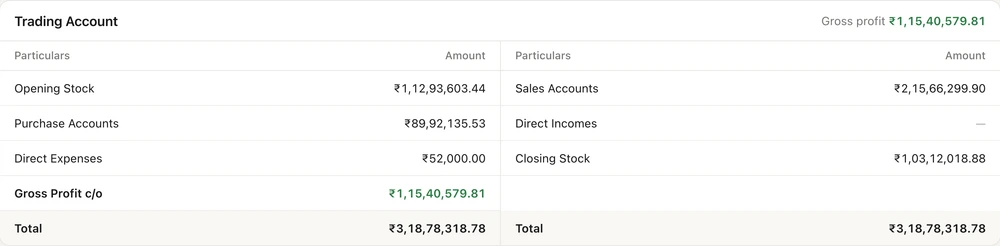
- Books without the backup. Trial balance, profit and loss, balance sheet, ledgers and day book from the client's TallyPrime, as of the last sync.
- Returns from the books. GSTR-1 and GSTR-3B prepared from the client's data and compared with the portal, with a due-date calendar.
- Non-filers and credit at risk. Purchases matched with GSTR-2B, with the credit at risk in rupees and a reminder to each supplier.
- Adjustments into TallyPrime. Pass journal entries from Auditer; they post into the client's TallyPrime, as optional vouchers if the client prefers.
- Each in their own language. You can work in English while your client reads the same books in Marathi or Tamil.
A day with Auditer
- 9:00 amCheck the week's due dates
- 10:30 amPrepare GSTR-1
- 12:30 pmFlag credit at risk
- 3:00 pmAnswer without a visit
- 5:30 pmClear e-invoices near the deadline
Read more
- 9:00 am · Check the week's due dates. Open each client's GST overview: what is due this week, what is filed, and the compliance score.
- 10:30 am · Prepare GSTR-1. For a distributor, GSTR-1 is ready from the books, beside what the portal holds. Review the differences and save a draft, if the client allows it.
- 12:30 pm · Flag credit at risk. GSTR-2B matching for a manufacturer shows four suppliers have not filed. Reminder emails go from the same screen.
- 3:00 pm · Answer without a visit. A retailer asks about last quarter's profit. Open their profit and loss in Auditer and answer on the call.
- 5:30 pm · Clear e-invoices near the deadline. Switch to a client over ₹10 crore and clear the invoices with the fewest days left under the 30-day rule.
What it costs
Estimate your costRead more
Each client's workspace is paid from that client's credits, by its Owner. Viewing a client's books is free; your seat in each workspace is 100 credits a month, and each GST feature costs 100 credits once per company to turn on.
Example for one client: your seat is 100 credits a month. The client's 60 e-invoices through Auditer at 2 credits are 120 credits, and 20 adjustment journals you post at 0.10 credit are 2 credits. Total: 100 + 120 + 2 = 222 credits a month, which is ₹222 plus GST, or ₹261.96, paid from the client's credits. Turning on GST returns and e-invoicing adds 100 credits each, once.
Frequently asked questions
Auditer helps chartered accountants and tax professionals see each client's TallyPrime books and GST position from one sign-in. Each client usually owns a workspace and invites you in with the role and data access they choose, and you switch between clients to prepare GSTR-1 and GSTR-3B from the books, match GSTR-2B and track e-invoices. Viewing is free, and your seat costs the client 100 credits a month.
Can a CA see several clients' Tally data in one app?
Yes. Each client invites you into their Auditer workspace, and you switch between workspaces from the same sign-in. If you keep clients' TallyPrime data on your own office PC, their companies can also sit in one workspace you own.
Who controls what the CA can see in Auditer?
The client's Workspace Owner. They choose your role, limit your access by company, financial year, ledger, godown and cost centre, and can suspend or remove you at any time.
Can I file a client's GST returns from Auditer?
Yes, if the client's Owner chooses filing for that company. You then file GSTR-1 or GSTR-3B from the web portal with the EVC sent to the authorised signatory; otherwise Auditer prepares the return or saves a draft on the portal.
Who pays for a CA's access to a client's workspace?
The client. Every chargeable action in a workspace, including your seat at 100 credits a month, is paid from that workspace Owner's credits.
Does Auditer prepare GSTR-9 and GSTR-9C?
No. Auditer does not prepare the annual return or the reconciliation statement, or amend filed returns. Its GSTR-1, GSTR-3B and GSTR-2B work gives you the monthly figures to start from.
Bring your Tally books with you
Install the Agent, connect TallyPrime and see your business on any screen in minutes. Start with 10 free credits.
10 free credits. No card needed.