Mobile app
Your business, in your pocket
The Auditer app for Android and iPhone shows your TallyPrime books wherever you are. Check balances, look up a party, create an invoice or a receipt, and nudge customers to pay, in your own language.
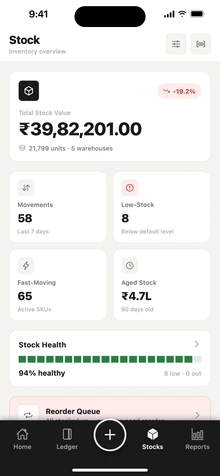
Home at a glance
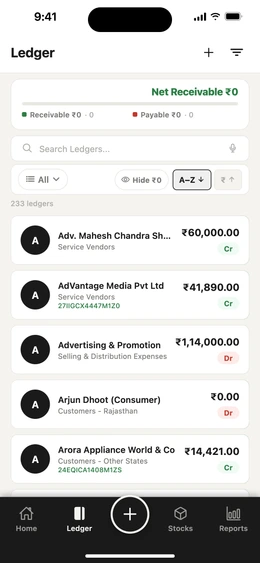
Ledgers and parties
Create entries on the go
Reports and GST
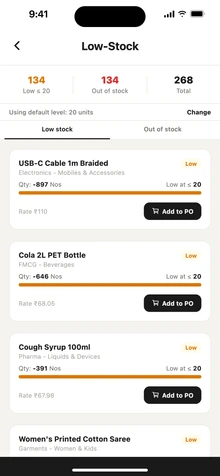
Reminders and alerts
Locked to you
Read more
- Home at a glance. Cash in hand, bank balance, receivables, payables, loans and today's payments and receipts, each with its detail screen.
- Ledgers and parties. Net receivable and payable, statements, and one tap to call, WhatsApp or send a reminder.
- Create entries on the go. Sales invoices, orders, receipts, payments, expenses and more, posted into TallyPrime.
- Reports and GST. Profit and loss, balance sheet, day book, GST returns, e-invoices, e-way bills and AI insights.
- Reminders and alerts. Set payment-reminder rules, see the history and get alerts for due dates and approvals.
- Locked to you. Sign in with your mobile number, then unlock with a PIN, fingerprint or face.
Get the app
Download Auditer free, sign in with the mobile number you use for your workspace, and pick your language.
Frequently asked questions
The Auditer mobile app is free to download on Google Play and the App Store. It shows the same data as the web portal, synced from TallyPrime, and entries you create on the phone are posted into TallyPrime through the Auditer Agent.
Is the Auditer app free?
Yes. The app is free to download. Viewing your data is free; actions such as posting an entry to TallyPrime use credits, the same as on the web portal.
Do I need the web portal as well?
Most daily work can be done in the app. Team management, roles, billing and some settings are on the web portal at app.auditer.com.
Does the app work with more than one company?
Yes. Switch between your synced Tally companies and between workspaces you belong to.
Can I use the app in my language?
Yes. Choose from English, Hindi, Marathi, Gujarati, Punjabi, Bengali, Tamil, Telugu, Kannada, Malayalam and Odia.
What happens to entries I make when the Tally PC is off?
They wait in a queue and are posted into TallyPrime when the Auditer Agent is running again. Each entry shows its status.
Bring your Tally books with you
Install the Agent, connect TallyPrime and see your business on any screen in minutes. Start with 10 free credits.
10 free credits. No card needed.