Ask Auditer
Ask how, in your own words
An AI assistant that explains your numbers and answers how-to questions.
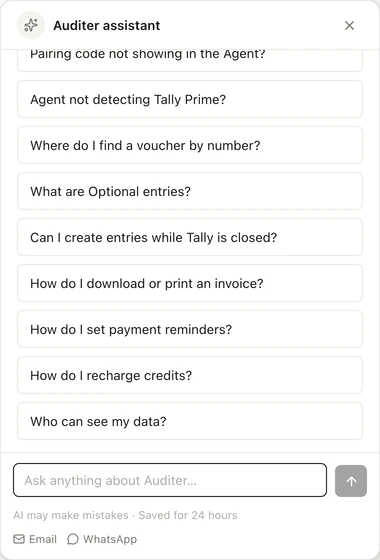
In short: Ask Auditer is an AI assistant that answers questions about using Auditer, drawing on the Help Center and replying in the language you write in, on the web portal, in the Android and iPhone apps and in the Auditer Agent. Together with AI insights, which narrate your month's numbers, it helps owners and staff understand Auditer and their figures without waiting for a call back. Both are free, and neither can change your books.
How-to answers
Step-by-step replies that use the exact screen and button names from the Help Center.
In your language
Ask in any of Auditer's 11 languages and the reply comes in the same one.
AI insights
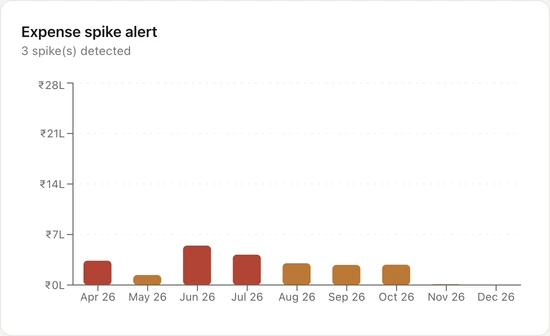
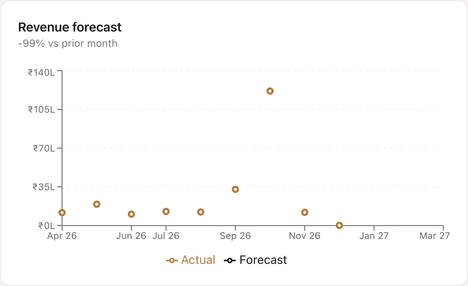
A monthly summary of your numbers: forecast, expense spikes, cash flow and risks.
Help where you are stuck
- On the web portal, in the apps and in the Auditer Agent
- Replies in the language you write in
- A person to reach by email or WhatsApp when you need one
Read more
Ask Auditer opens from the button at the bottom right of every page of the web portal, from Help Center in the app's Settings, and from Help Center in the Auditer Agent once it is paired. Ask how to pair TallyPrime, why an entry has not posted or where to set reminders, and it replies with the steps, naming the screens and buttons to use. It answers only from Auditer's Help Center, and when it does not know, it gives you the support email and WhatsApp number instead of guessing.
AI insights explain the month
- Refreshed monthly, with the date of the next refresh
- For the Owner and the roles you allow
- Rules-based text if the AI is unavailable
Read more
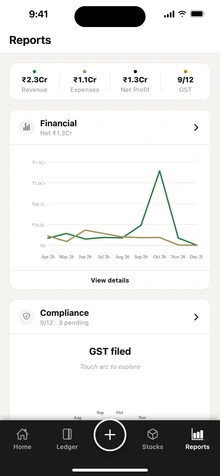
For the current financial year, AI insights reads your synced books and writes a short summary each month: a revenue forecast, expense spikes, cash flow, customers who may pay late and items that may run out, with recommendations. Past years get a rules-based summary instead. Open it from AI Insights on the web portal or from Reports in the app; the financial overview also carries a weekly forecast.
It explains. It does not touch your books.
- No power to change entries, masters or settings
- Only the question or summarised figures are sent
- Chat history in the app is kept for 24 hours
Read more
Neither the assistant nor AI insights can create, change or delete anything in Auditer or TallyPrime. The assistant does not read your company books; it works from the Help Center. To answer, Auditer sends your question, or for AI insights the summarised figures needed, to its AI provider, Groq, in the USA. The provider is listed with the others on our sub-processors page.
How to ask a question
- 1Open the assistantClick Ask Auditer at the bottom right of the web portal, or open Settings, then Help Center in the app.
- 2Ask in your own wordsType your question in any language Auditer supports.
- 3Follow the stepsThe reply names the screens and buttons to use. If it cannot help, it gives you support's email and WhatsApp.
What it costs
Ask Auditer and the Help Center are free for every member, and AI insights is free for the Owner and the roles with access. None of them uses credits.
Estimate your cost- Ask Auditer and the Help Center
- Free
- AI insights
- Free
Frequently asked questions
What is Ask Auditer?
Ask Auditer is the AI help assistant in Auditer. It answers questions about using Auditer from the Help Center, on the web portal, in the Android and iPhone apps and in the Auditer Agent.
Can Ask Auditer see my accounts?
No. Ask Auditer answers from the Help Center and does not read your company books. AI insights, which do use your figures, send only the summarised figures needed to the AI provider.
Can Auditer's AI change entries in TallyPrime?
No. Ask Auditer and AI insights only explain. Entries reach TallyPrime only when a member creates them in Auditer and the Auditer Agent posts them.
Does Ask Auditer answer in Hindi and other Indian languages?
Yes. Write your question in Hindi, Tamil, Gujarati or any of Auditer's 11 languages, and Ask Auditer replies in the same language.
Is Ask Auditer free?
Yes. Ask Auditer, the Help Center and AI insights use no credits.
Bring your Tally books with you
Install the Agent, connect TallyPrime and see your business on any screen in minutes. Start with 10 free credits.
10 free credits. No card needed.