Dashboards & reports
Cash, dues and profit from your Tally books, on any screen
Cash, bank, receivables, profit and loss and balance sheet at a glance, with AI insights.

- Cash and dues at a glance
- The reports you know
- AI insights
A dashboard you can read in a minute
- Switch company and financial year from the top bar
- Receivables and payables by age, with an overdue-only filter
- Call or WhatsApp a party from the list
Read more
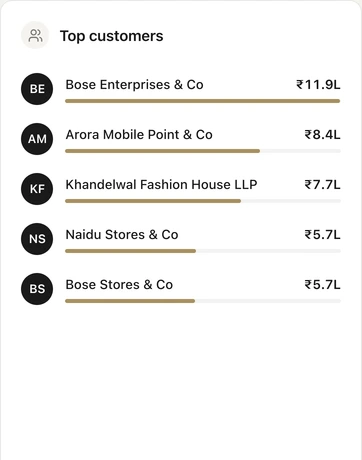
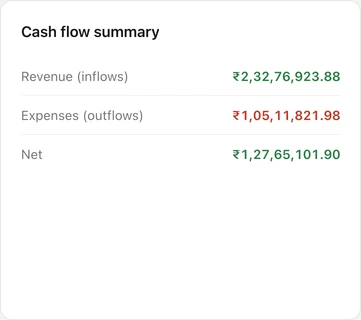
The dashboard opens with sales, purchases and expenses, then a strip of cash in hand, bank balance, receivables, payables, loans and overdrafts, receipts and payments. Click any figure to open the detail behind it, such as the parties and bills that make up your receivables. A turnover chart covers 7 days to 6 months, with cash flow, top customers and recent activity below it. The Android and iPhone apps show the same figures on the Home screen.
Financial reports, straight from the books
- A financial overview with revenue, expenses, and gross and net profit
- Expenses by category, direct and indirect, and a cash flow report
- One search box for screens, vouchers, parties and stock items
Read more
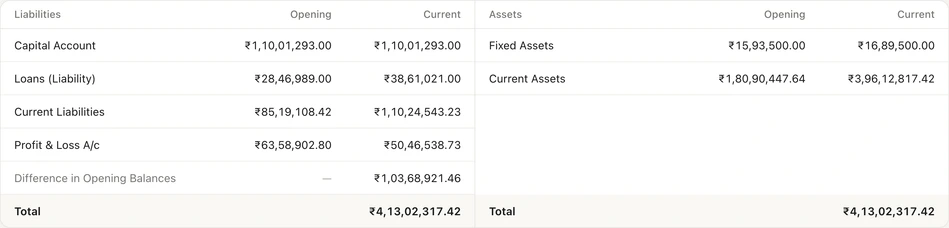
Profit and loss, balance sheet, trial balance and cash register are built from the same TallyPrime data your accountant keeps. The trial balance shows its grand total and any difference, and vouchers cancelled in Tally are left out of totals. The day book lists every voucher, and each ledger opens to its statement. Select rows to share them on WhatsApp or download them as a PDF or CSV.
AI insights explain the month
- Top customers and suppliers for the year
- A weekly forecast on the financial overview
- For the Owner and the roles you allow
Read more
AI insights reads your synced books and writes a short summary in plain language: a revenue forecast, expense spikes, the cash flow position, customers who may pay late and items that may run out, with recommendations. For the current financial year it is refreshed every month; past years get a rules-based summary without a forecast. It explains your figures and never changes your books.
How to open your reports
- 1Connect TallyPrime
- 2Pick a company and year
- 3Open a report
- 4Share what you need
Read more
- 1. Connect TallyPrime. Install the Auditer Agent on the Tally PC and pair it with your workspace. The first sync brings in your companies.
- 2. Pick a company and year. Choose them in the top bar of the web portal, or tap the company name and year on the app's Home screen.
- 3. Open a report. Financials holds profit and loss, balance sheet, trial balance and cash register; Audit Trail holds the day book.
- 4. Share what you need. Select rows to send on WhatsApp, or download a PDF or CSV for your accountant.
What it costs
Estimate your costRead more
Dashboards, financial reports and AI insights are free, however often you open them. The Owner's seat is free; each other member who signs in needs a seat at 100 credits a month.
- Dashboards and reports
- Free
- AI insights
- Free
- Seat for each member after the Owner
- 100 credits a month
Frequently asked questions
Dashboards & reports is the part of Auditer that shows your TallyPrime books as a live dashboard and standard financial reports on the web portal and the Android and iPhone apps. It helps owners check cash, bank, dues, sales and profit without waiting for the accountant, and lets accountants answer questions from anywhere. Dashboards, reports and AI insights are free.
Can I see Tally reports on my mobile?
Yes. Auditer shows your TallyPrime data on the Android and iPhone apps and the web portal, including profit and loss, balance sheet, cash register, day book and ledgers. The Auditer Agent on your Tally PC keeps the data in step.
Are Auditer's reports the same as in TallyPrime?
They are built from the data the Auditer Agent syncs from TallyPrime, for the company and financial year you select. Entries made in Tally after the last sync appear after the next one.
Does the Tally PC need to be on to see reports?
No. Auditer shows your data as of the last sync even when the Tally PC is off. New entries made in Tally appear once the Agent syncs again.
What are AI insights in Auditer?
AI insights is a monthly summary of your current financial year, written by AI from your synced books: a revenue forecast, expense spikes, cash flow, receivables and stock-out risks, and recommendations. It is free, and only the summarised figures needed are sent to the AI provider.
Can staff see the dashboard without seeing bank balances?
Yes. Bank and cash balances, cost price, margin and other sensitive values can be hidden for a role and then show as a dash. Data access can also limit each member to chosen companies, years and ledgers.
Related features
Bring your Tally books with you
Install the Agent, connect TallyPrime and see your business on any screen in minutes. Start with 10 free credits.
10 free credits. No card needed.